
DNS Filtering - protect your business from malicious websites and hackers
🛡️ Imagine this for a moment…
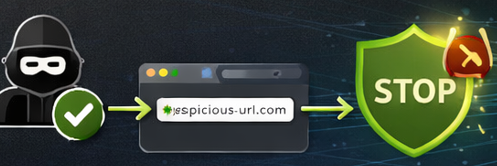
One of your team receives a phone call from someone claiming to be part of the Purity IT team....
They sound professional. They know your company name and say they’ve noticed suspicious activity on your Microsoft 365 account.
They explain they just need the user to visit a quick website so they can “check the connection” or install a small remote support tool.
The employee clicks the link.
Within minutes, someone outside your organisation could potentially have remote access to that computer.
The worrying part?
The call sounded completely legitimate.
Unfortunately, criminals are increasingly impersonating IT providers and using information from company websites or LinkedIn profiles to make these calls sound convincing.
How Purity IT actually works
If a member of the Purity IT team ever needs to access your computer, it will never start with a request to visit a random website.
We use our Datto RMM management platform to securely connect to and manage the systems we support.
On the rare occasion we need to use a remote support tool such as Splashtop, the connection would always be initiated through our helpdesk system, not through a link sent during an unexpected phone call. If you ever receive a call that doesn’t feel quite right, it’s always fine to end the call and contact our helpdesk directly.
How DNS filtering helps protect your business
DNS filtering adds an additional layer of protection between your team and potentially dangerous websites.
Instead of relying on someone recognising that something looks suspicious, DNS filtering simply blocks access to risky websites before they even load.
If a user clicks a malicious link or is directed to a fake support website, the connection is stopped immediately.
No website.
No download.
No remote access.
It’s a simple but very effective way to reduce risk.
What DNS filtering can help block
DNS filtering can prevent access to many of the types of websites commonly used in cyber attacks, including:
• Fake login pages designed to steal passwords
• Websites distributing malware or ransomware
• Impersonation scams launching remote access tools
• Known phishing websites
• Suspicious domains created specifically for cyber attacks
By stopping these websites from loading, the threat is blocked before it reaches the user’s device.
Safer internet use for your organisation
DNS filtering can also help organisations manage access to certain types of online content.
Policies can be configured to help block categories such as:
• known phishing and scam websites
• malware and ransomware download sites
• newly registered domains often used in attacks
• risky file-sharing or anonymous download sites
• inappropriate or non-work websites if required
The aim is not to restrict normal work activity, but to reduce the chance of staff accidentally visiting websites that could expose the business to risk.
A simple extra layer of protection
Most cyber incidents begin with a link, a website, or a download.
DNS filtering helps stop these threats much earlier in the process by preventing access to dangerous websites in the first place.
For many organisations, it provides another valuable layer of protection alongside email security, monitoring, backups and endpoint protection.
Want to learn more?
If you would like to learn more about how DNS filtering works or how it could be added to your existing protection stack, the Purity IT team would be happy to talk you through it.
👉 Get in touch with us to learn more about DNS filtering protection
Contact us 0333 577 2002